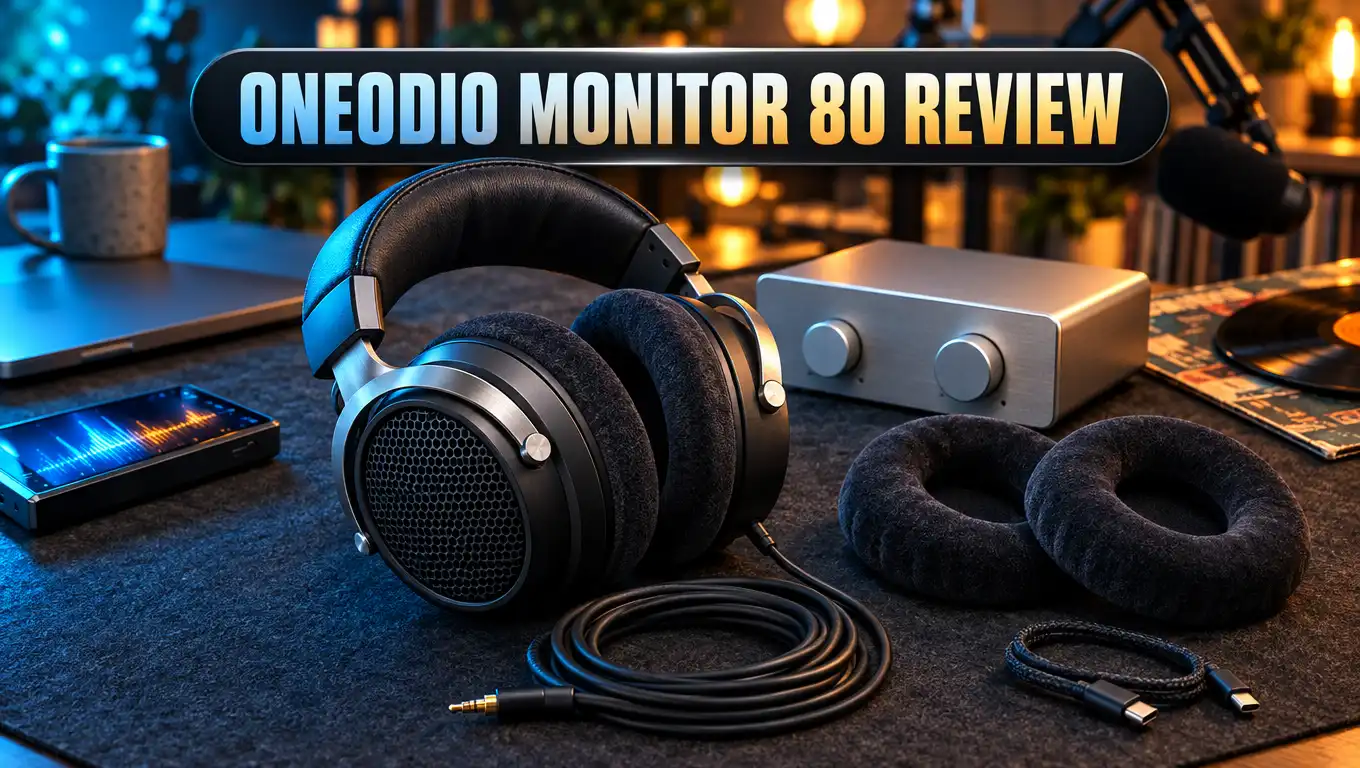
OneOdio Monitor 80 Review: Open Back Headphone Worth Buying?
Do you want open back studio headphones without spending a fortune? The OneOdio Monitor 80 promises studio sound, comfort, and a pro spec sheet for about the price of a nice dinner out. That is a bold claim, and we wanted to see if it holds up.
In this review, we cover the design, comfort, sound, power needs, and value of the Monitor 80. We also share three solid alternatives. By the end, you will know if this headphone fits your desk, your ears, and your budget.
In a Nutshell
Short on time? Here is what you need to know about the OneOdio Monitor 80 before you read the full review.
- True open back design: The Monitor 80 is a real open back headphone, not a fake grille. This gives it a more natural and airy sound than closed models in its price range.
- High 250 ohm impedance: The 40mm drivers have a 250 ohm rating. A laptop or PC can drive them, but a headphone amp or audio interface brings out their best sound.
- Excellent comfort: Soft velour ear pads and a padded headband make long sessions easy. Many users wear them for three to four hours without pain or heat buildup.
- Smart cable system: You get two detachable cables and two jacks on the earcups. You can plug in on either side, and you can even share audio with a second headphone.
- Detailed but bright sound: The Monitor 80 shows lots of detail and clean imaging. The treble can sound sharp on some vocals, and reviewers do not agree on how flat the tuning is.
- Great value: It usually sells for under $100. For beginners in mixing, gaming, or critical listening, it gives you a lot of performance for the money.
What Is the OneOdio Monitor 80?

- Open-back studio headphones: Hi-Res audio certified, Monitor 80 is a reliable companion for mastering...
- 250 ohm nominal impedance: The sound it delivers is more stable, solid, and powerful. They must be driven...
Last update on 2026-11-29 / Affiliate links / Images from Amazon Product Advertising API
The OneOdio Monitor 80 is a wired, over ear, open back studio headphone. It was OneOdio’s first open back model. The brand is best known for cheap DJ headphones like the Monitor 60 and the Pro 10.
With the Monitor 80, OneOdio aims at a more serious crowd. It targets home producers, mixing beginners, podcasters, and music lovers. The 250 ohm impedance alone shows the company wanted a real studio tool.
The Monitor 80 sits in a busy price bracket. It competes with legends like the AKG K240, the Philips SHP9500, and the Samson SR850. These headphones have ruled the budget studio market for years.
So what makes the Monitor 80 different? It mixes a pro style spec sheet with smart extras. You get dual cables, dual jacks, and soft velour pads, all at a low price.
OneOdio markets this headphone for mixing, mastering, editing, and studio monitoring. Many buyers also use it for gaming and relaxed listening. The open design gives a wider feel than most closed headphones at this price.
The big question is simple. Can a budget brand make a real studio headphone? After digging through test results, user feedback, and specs, we can say the answer is mostly yes, with a few catches.
Let’s start with the numbers. Then we will move on to how it looks, feels, and sounds.
Key Specifications at a Glance
Specs do not tell the whole story. Still, they help you understand what you are buying. Here are the main specs for the OneOdio Monitor 80.
The headphone uses 40mm dynamic drivers. That is smaller than the 50mm drivers in the Monitor 60. Driver size alone does not decide sound quality, so don’t worry too much about it.
The impedance is 250 ohms. That is high for a budget headphone. High impedance drivers often sound cleaner when you feed them proper power.
Sensitivity is listed at around 94 to 100 dB, plus or minus 3 dB. The two numbers come from different OneOdio listings. In practice, the Monitor 80 needs more power than a phone can give to reach a strong volume.
The frequency response runs from 10Hz to 40kHz. That range goes beyond human hearing at both ends. Distortion is rated at 1 percent or less.
The headphone weighs just under 300 grams. That is light enough for long sessions. The earcups swivel, and the headband slider is made of metal.
For connection, you get two jacks. The left earcup has a 3.5mm port and the right earcup has a 6.35mm port. Both cables are detachable.
There are no controls, no microphone, and no Bluetooth. This is a pure wired studio headphone. It also has no battery, so it never needs charging.
On paper, the Monitor 80 looks like a headphone that costs twice its price. Now let’s see how it holds up in real use.
Unboxing and What Comes in the Box
Unboxing the OneOdio Monitor 80 feels pleasant for a budget product. The box is simple but well packed. Everything sits snugly in place.
Inside, you find the headphones and two cables. The first is a straight 3.5mm to 3.5mm cable about 3 meters long. It works well for PCs, laptops, and audio interfaces with a mini jack.
The second is a coiled cable with a 3.5mm plug on one end and a 6.35mm plug on the other. It stretches from about 1 meter to 3.5 meters. This cable is perfect for mixers, amps, keyboards, and studio gear.
Some packages also include a small headphone stand or holder. It is not fancy, but it keeps your desk tidy. It is a nice touch at this price.
You also get a basic user manual. There is no carrying case. Since this is a studio headphone, most people will keep it at home anyway.
The first impression is good. The headphones feel solid in the hand. The metal ring around the earcup grille adds a premium look that you don’t often see under $100.
The included cables are thick and feel durable. The coiled cable has a nice spring to it. It does not tangle easily, which is great for DJs and producers who move around.
Overall, the box gives you everything you need to start right away. You can plug into almost any device without buying adapters. That is real value for beginners.
Top 3 Alternative for OneOdio Monitor 80
The Monitor 80 is a strong pick, but it is not the only option. Here are three popular alternatives you should think about before you buy.
Philips SHP9500
No products found.
The Philips SHP9500 is a budget open back classic. It uses large 50mm drivers and has a low 32 ohm impedance. That means you can plug it straight into a phone or laptop without an amp.
Its sound is airy and fairly balanced, with a wide soundstage. Bass is a bit light, but the mids are clean. If you want easy power and a relaxed sound, the SHP9500 is a great choice.
beyerdynamic DT 990 PRO (250 Ohm)

- 250-ohm studio impedance: designed for audio interfaces and headphone amps - it needs one for full...
- The mixing reference: the open-back sound studios have trusted for decades, for honest mixes that...
Last update on 2026-11-29 / Affiliate links / Images from Amazon Product Advertising API
The beyerdynamic DT 990 PRO is a studio legend made in Germany. It shares the same 250 ohm impedance as the Monitor 80. It needs an amp or audio interface to shine.
It has deep bass, crisp treble, and a wide stage. The build is tough and the velour pads are very comfy. It costs more, but many people keep it for ten years or longer.
Samson SR850

- Semi-open design for enhanced ambient listening environment
- 50mm drivers for exceptional reproduction and wide dynamic range
Last update on 2026-11-29 / Affiliate links / Images from Amazon Product Advertising API
The Samson SR850 is a semi open headphone with 50mm drivers. It is one of the cheapest studio headphones that people still respect. It is easy to drive and works well with phones and interfaces.
The sound is bright and detailed, with decent bass. The build is mostly plastic, and the self adjusting headband is simple. For a tight budget, the SR850 is a smart starter pick.
Design and Build Quality
The OneOdio Monitor 80 looks clean and modern. It keeps some design cues from the older Monitor 60. But it adds a few upgrades that make it feel more mature.
The body is mostly plastic, which keeps the weight down. The earcup backs have a circular metal ring around a real open grille. This open grille lets sound flow in and out freely.
The headband slider is metal. It moves smoothly and holds its position well. You can adjust the fit in seconds.
The earcups can swivel up to 180 degrees. This helps them fit different head shapes. The brackets are smaller than on the Monitor 60, so the cups do not flop around as much.
There is one small issue. Some users notice a light creaking sound when they move the earcups. It does not affect the sound, but it can be a bit annoying.
The headband is thick and soft, with a faux leather cover. It spreads the weight evenly across your head. We have seen few complaints about hot spots on top.
Since this is an open back headphone, sound leaks out. People near you will hear your music. This makes the Monitor 80 a poor choice for offices, libraries, or public transport.
It also does not block outside noise. You will hear your fan, your keyboard, and your family. That is normal for any open back headphone.
Overall, the build feels solid for the price. It is not as tough as a beyerdynamic, but it is well made for daily studio and home use.
Comfort for Long Sessions
Comfort is one of the biggest strengths of the Monitor 80. Many reviewers and buyers praise it as one of the comfiest budget studio headphones around.
The main reason is the ear pads. They use soft velour fabric instead of faux leather. Velour lets your ears breathe, so they stay cooler during long sessions.
The ear cups are large and deep. Most ears fit fully inside without touching the drivers. This helps with comfort over many hours.
The clamp force is moderate. It holds the headphone in place without squeezing too hard. Users with larger heads report a comfortable fit too.
Many users wear the Monitor 80 for three to four hours straight without fatigue. That is a big deal for producers who spend whole evenings on a mix. It also helps gamers in long matches.
The light weight of just under 300 grams also helps. You barely feel the headphone after a while. Heavy headphones often cause neck strain, but this one avoids that problem.
The padded headband adds to the comfort. It has enough foam to stop pressure on the top of your head. Even people with thin hair or bald heads should feel fine.
One small tip: velour pads can collect dust and hair. You should clean them gently from time to time. You can also replace them if they wear out.
If comfort matters most to you, the Monitor 80 is a very easy recommendation. It feels better on the head than many headphones that cost twice as much.
Sound Quality: Bass, Mids, and Treble
Sound is where opinions about the Monitor 80 split. Some reviewers call it balanced and analytical. Others call it V shaped, with boosted bass and treble. The truth sits somewhere in the middle.
Let’s start with the bass. The Monitor 80 has more low end punch than the AKG K240. The sub bass reaches deep for an open back headphone. Mid bass, however, can sound a bit thin and dry.
Bass fans should not expect a club thump. The bass is clean and controlled, not heavy. For mixing, that is actually a good thing.
The mids are a strong point. Vocals sound clear and slightly forward. Guitars, pianos, and strings have nice texture and detail.
Many listeners say they can hear small sounds they missed before. You might notice a chair creak or a breath between lines. That level of detail is rare under $100.
The treble is the weak spot. It is bright and sometimes sharp. On some songs, you will hear sibilance, which means harsh “s” and “t” sounds.
Some reviewers find the upper treble tiring at high volume. Others say it simply reveals flaws in the recording. If you are sensitive to bright sound, keep this in mind.
The overall tone is a bit cool. It is not warm or lush. It favors clarity over musical color.
For casual listening, the Monitor 80 sounds lively and fun. For serious mixing, it works well as a second reference, but you should check your mixes on speakers too. That is true for almost any budget headphone.
Soundstage and Imaging
Open back headphones are famous for their soundstage. This is the feeling of space around your head. The Monitor 80 does well here, though it is not the widest headphone out there.
The stage is wider than closed back headphones at the same price. It is also wider than the Monitor 60. Music feels less stuck inside your head.
It does not sound like a huge concert hall. Instead, it feels like you are sitting close to the performers. Some reviewers say the stage feels a bit boxed in next to rivals like the Monitor 60 or the SHP9500.
Where the Monitor 80 shines is imaging. Imaging means how well you can place each sound. On this headphone, you can point to each singer and instrument with ease.
Instrument separation is very good. Even in busy rock tracks, each part has its own space. Guitars, drums, and vocals do not blur together.
This makes the Monitor 80 useful for gaming too. In shooters, you can hear footsteps and tell where they come from. Open back headphones like this give you a natural sense of direction.
Binaural recordings sound especially good. Some listeners even paused songs because they thought a sound came from outside their room. That shows how realistic the positioning can be.
For mixing, good imaging helps you place sounds in the stereo field. You can hear if a guitar sits too far left or a vocal drifts off center. That is a real advantage for home producers.
Power Needs: Do You Need an Amp?
The Monitor 80 has a 250 ohm impedance. That number scares some buyers. So, do you really need an amp?
The short answer is: it depends on your source. Most phones and many tablets will struggle. You will get low volume and a thin, weak sound.
A good laptop or desktop PC can usually drive it. Many users run the Monitor 80 from a MacBook Pro or a quality motherboard sound card. The volume is fine, but you may need to turn it up high.
For the best sound, use a headphone amp or an audio interface. Popular interfaces like the Focusrite Scarlett series work well. A small desktop DAC and amp combo also does the job.
With proper power, the Monitor 80 sounds tighter and fuller. Bass gains more control. Details become cleaner and more natural.
Even OneOdio suggests using an amp for top sound quality. That is honest advice. High impedance headphones simply need more voltage to perform well.
There is also a bonus to high impedance. It makes the headphone safer with pro studio gear. Strong mixer outputs are less likely to cause distortion or damage.
If you only listen on your phone, the Monitor 80 is not the right choice. Look at the Philips SHP9500 or Samson SR850 instead. They need far less power.
If you already own an interface, though, the Monitor 80 is a perfect match. It will plug right in and perform.
Cables and Dual Jack Connectivity
The cable system on the Monitor 80 is one of its smartest features. Many reviewers call it clever, and we agree.
The headphone has two input jacks. The left cup has a 3.5mm port and the right cup has a 6.35mm port. You can plug your cable into either side.
This gives you freedom at your desk. If your interface sits on the right, use the right jack. If your PC sits on the left, use the left jack.
The second jack also lets you share audio. You plug one cable into your source and a second cable into a friend’s headphone. Both of you hear the same sound.
This “daisy chain” feature is handy for teaching, band practice, or recording sessions with a partner. It also works well for DJs who want to share a mix.
The two included cables cover almost every setup. The straight 3.5mm cable suits computers and portable gear. The coiled 6.35mm cable suits mixers, amps, and keyboards.
Detachable cables are a big plus for long term use. If a cable breaks, you just replace it. You do not need to throw away the whole headphone.
The plugs feel solid and lock in firmly. You won’t get crackling sounds when you move your head. The coiled cable is long enough to reach a distant rack or mixer.
There is no inline mic or remote. That is normal for studio headphones. If you need a mic for calls or gaming, use a separate desk microphone.
Who Should Buy the OneOdio Monitor 80?
The Monitor 80 fits some users very well. For others, a different headphone makes more sense. Here is a simple guide.
Home producers and beginners in mixing will love it. It gives clear detail and good imaging at a low price. It pairs well with any basic audio interface.
Podcasters and video editors can also benefit. The clear mids make voices easy to judge. You can spot noise, clicks, and breaths in your recordings.
PC gamers who play at home will enjoy the open sound. The imaging helps with positional audio in shooters and adventure games. Just add a separate mic.
Music lovers who sit at a desk will find it fun and detailed. It works best with acoustic, rock, and electronic music. Bright treble may bother some listeners on harsh recordings.
Now, who should skip it? If you commute or travel, skip it. The open design leaks sound and blocks no outside noise.
If you only use a phone, skip it. The 250 ohm drivers need more power than most phones give.
If you are very sensitive to treble, think twice. The bright highs and sibilance can feel tiring for some ears.
If you want a bass heavy sound, look elsewhere. The Monitor 80 has controlled bass, not a big boom.
For most home studio users on a budget, though, the Monitor 80 is a smart and safe pick. It gives you a lot of headphone for very little money.
Pros and Cons
Every headphone has strong points and weak points. Here is a clear look at what the OneOdio Monitor 80 does well and where it falls short.
Pros
- Very comfortable fit: Soft velour pads and a light frame make long sessions easy. Many users wear it for hours without any pain or heat.
- True open back sound: The real open grille gives a natural, airy sound. It feels more spacious than closed headphones at the same price.
- Excellent detail for the price: You can hear small sounds and layers in your music. This helps with mixing, editing, and critical listening.
- Strong imaging: It places instruments and voices with precision. This also helps with positional audio in games.
- Smart dual jack system: You can plug in on either side. You can also share audio with a second headphone.
- Two detachable cables included: You get a straight cable and a coiled cable. They cover computers, interfaces, mixers, and amps.
- Great value: It usually costs under $100. It competes with headphones that cost much more.
Cons
- Bright and sometimes sharp treble: Some vocals show sibilance. Long sessions at high volume can feel tiring.
- Needs decent power: The 250 ohm drivers struggle on phones. An amp or audio interface gives the best results.
- Light creaking from earcups: Moving the cups can make a small squeak. It does not affect sound but can be annoying.
- Leaks sound and lets noise in: It is not good for offices or public places. This is normal for open back designs.
- Mostly plastic build: It feels solid, but it is not as tough as premium studio headphones.
Final Verdict
So, is the OneOdio Monitor 80 worth buying? For most home studio users and desk listeners, the answer is yes.
OneOdio took a real risk with its first open back headphone. The result is better than many people expected. It is comfortable, detailed, and packed with smart features.
The comfort is top class for the price. The velour pads and light weight make it easy to wear all evening. That alone puts it ahead of many rivals.
The sound is clear and lively. Mids and imaging stand out. Bass is clean and has more punch than the AKG K240.
The treble is the main weakness. It can sound bright and a little harsh on some tracks. Reviewers do not fully agree on how neutral the tuning is, so don’t treat it as a perfect reference.
The cable system is a real highlight. Dual jacks and two included cables make it easy to use with almost any gear. You also get the fun bonus of sharing audio with a friend.
You will need decent power to get the best sound. If you already own an audio interface or amp, that is no problem. If you only use a phone, choose an easier headphone like the SHP9500.
In the end, the Monitor 80 offers excellent value under $100. It is a great first open back headphone for beginners. It also works as a comfy second pair for experienced producers.
If you want studio style sound and all day comfort without spending much, the OneOdio Monitor 80 deserves a top spot on your shortlist.
FAQs
Is the OneOdio Monitor 80 good for mixing?
Yes, it is good for beginners in mixing. It offers clear detail and strong imaging. The treble is a bit bright, so check your mixes on speakers too.
Do I need an amp for the OneOdio Monitor 80?
You don’t strictly need one, but it helps a lot. A good PC or laptop can drive it. For the best sound, use a headphone amp or an audio interface.
Can I use the OneOdio Monitor 80 with my phone?
You can, but it will sound quiet and thin. The 250 ohm drivers need more power than most phones give. A small portable DAC and amp can fix this.
Is the OneOdio Monitor 80 good for gaming?
Yes, it works well for gaming at home. The open design and strong imaging help you hear footsteps and direction. You will need a separate microphone.
Does the OneOdio Monitor 80 leak sound?
Yes, it leaks sound because it is open back. People near you can hear your music. It also lets outside noise in.
How does the Monitor 80 compare to the Monitor 60?
The Monitor 80 is open back, while the Monitor 60 is closed back. The Monitor 80 has a wider stage and higher impedance. The Monitor 60 is easier to drive and blocks more noise.
Can I replace the ear pads on the Monitor 80?
Yes, the ear pads are removable. You rotate them out of their groove. This makes cleaning and replacing them simple.
Does the OneOdio Monitor 80 have a microphone?
No, it has no built in mic. It is a pure studio headphone. Use a desk or clip mic for calls, streams, or games.

Dillip is the founder and editor of dillip.net, a passionate tech enthusiast and AI explorer dedicated to simplifying the world of artificial intelligence and technology for everyday users. With a keen eye for detail, he provides honest reviews, in-depth comparisons, and practical guides to help readers make smarter tech decisions.